
Deltran’s Battery Tender Plus is a versatile, fully automatic charger designed for 12V lead-acid, AGM, and gel batteries.
This instruction manual guides users through safe and effective operation, ensuring optimal battery health and longevity for various applications.
What is a Battery Tender Plus?
The Battery Tender Plus is a sophisticated, multi-stage charger created by Deltran, designed to maintain and extend the life of lead-acid, AGM, and gel batteries. Unlike traditional chargers, it intelligently switches between charging modes – bulk, absorption, and float – to prevent overcharging and sulfation.
This instruction manual will detail how it automatically detects battery voltage and adjusts its charging process accordingly, making it ideal for seasonal vehicles, motorcycles, boats, and more. It’s a reliable solution for keeping batteries topped off and ready to use.
Benefits of Using a Battery Tender Plus
Employing a Battery Tender Plus, as detailed in this instruction manual, offers numerous advantages. It prevents battery degradation during storage, eliminating the need for jump-starts and extending battery lifespan. The automatic charging cycles ensure batteries are always fully charged and ready for use, providing peace of mind.
Furthermore, it combats sulfation, a common cause of battery failure, and maintains optimal voltage levels. This charger is a cost-effective solution for preserving battery investments and ensuring reliable power when needed.
Understanding the Components
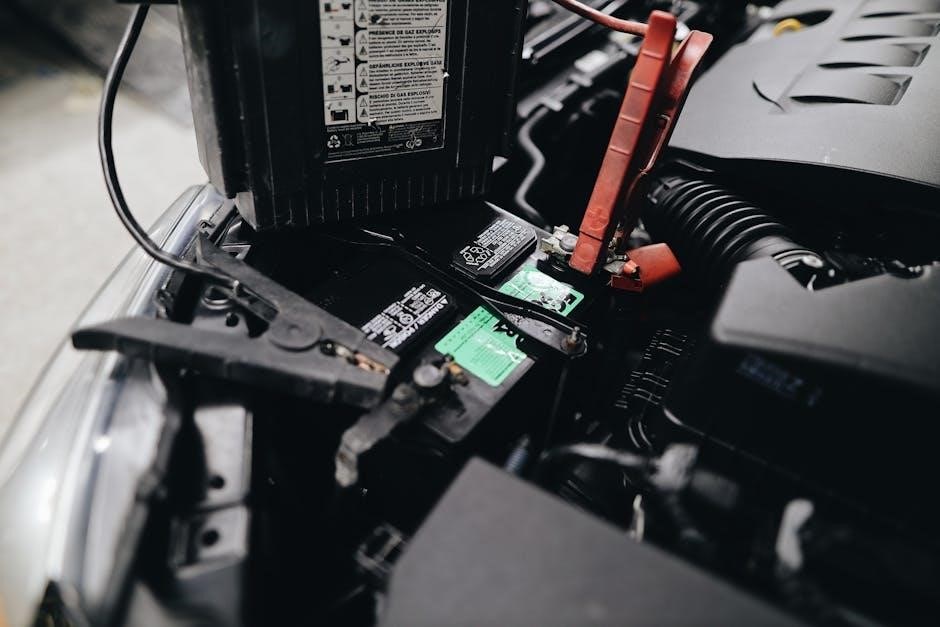
This instruction manual details the Battery Tender Plus’s key parts: the charger unit, various cable and connector types, and informative LED indicator lights.
Charger Unit Overview
As per the instruction manual, the Battery Tender Plus charger unit is a robust, weatherproof device designed for reliable performance. It features a compact enclosure housing the charging circuitry and status indicators. The unit’s construction prioritizes durability, ensuring longevity even in challenging environments.
It includes connection points for the DC output cable to the battery and the AC input cable for power. Understanding these physical aspects, detailed in the manual, is crucial for proper setup and operation.
Cable and Connector Types
The instruction manual details two primary cable types: the DC output cable connecting to the battery terminals, and the AC input cable for mains power. The DC cable typically features a ring terminal for secure attachment.
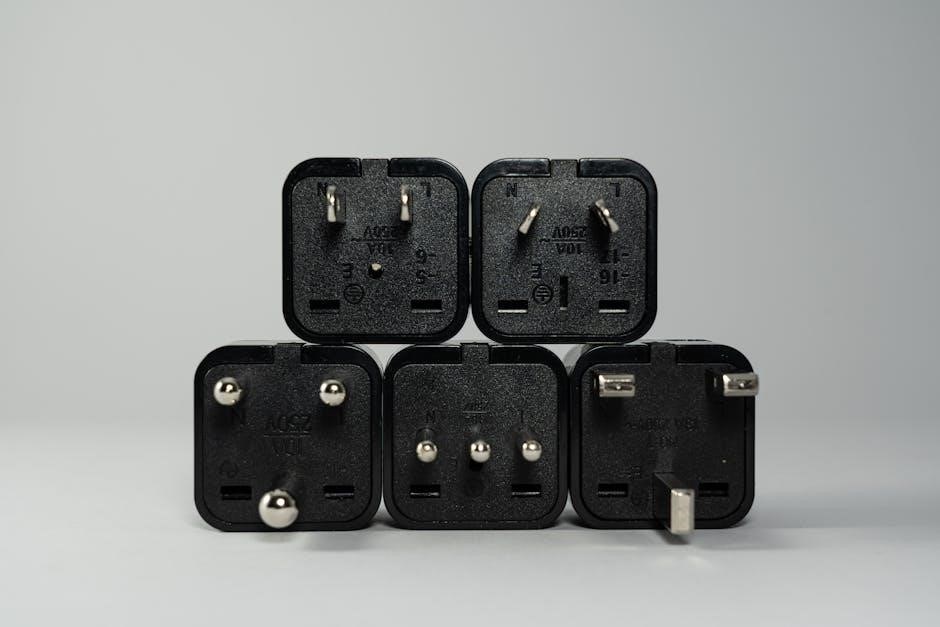
Connector types vary based on regional power standards. Proper cable selection and secure connections are vital, as outlined in the manual, to prevent power loss and ensure safe, efficient charging. Inspect cables regularly for damage.
LED Indicator Lights – A Comprehensive Guide
The Battery Tender Plus instruction manual provides a detailed explanation of the LED indicators. A solid green light signifies a fully charged battery in maintenance mode.
A flashing red light indicates a potential issue, such as reverse polarity or a deeply discharged battery. The manual clarifies specific error codes displayed via flashing patterns, aiding troubleshooting. Understanding these signals is crucial for optimal charger performance and battery health;
Setting Up Your Battery Tender Plus
The instruction manual emphasizes a pre-use inspection of cables and connectors. Proper connection to the battery terminals – positive to positive, negative to negative – is vital.
Initial Inspection Before Use
Before each use, the instruction manual stresses a thorough inspection of the Battery Tender Plus. Carefully examine the AC power cord for any cracks or damage to the insulation.
Inspect the DC cables and connectors for corrosion, fraying, or loose connections. Ensure the alligator clips are clean and securely attached. A visual check confirms the charger unit itself hasn’t sustained any physical damage during storage or transport.
Addressing these issues proactively ensures safe and efficient charging, preventing potential hazards and maximizing the charger’s lifespan.
Connecting to the Battery – Positive and Negative Terminals
The instruction manual emphasizes correct polarity when connecting the Battery Tender Plus. First, disconnect the battery from the vehicle or device. Attach the red (+) clip to the positive terminal of the battery, and the black (-) clip to the negative terminal.
Double-check the connections to avoid sparks or damage. Ensure clips have a secure grip. A reverse connection can damage the charger and the battery, voiding the warranty.
Always connect to the battery before plugging into AC power.
AC Power Connection and Voltage Requirements
The instruction manual states the Battery Tender Plus is designed for standard 120V AC outlets. Verify your outlet voltage matches the charger’s requirements before plugging in. Do not use adapters or extension cords unless absolutely necessary, and ensure they are appropriately rated for the charger’s amperage;
Avoid connecting to outlets with damaged wiring or overloaded circuits. The charger automatically switches between 50/60Hz, making it suitable for international use with a proper plug adapter.

Charging Modes Explained
The instruction manual details three modes: Standard, Float, and Boost. Standard charges, Float maintains, and Boost recovers deeply discharged batteries efficiently.
Standard Charging Mode
As per the instruction manual, Standard Charging Mode is the initial phase for most batteries. It delivers a controlled current to replenish the battery’s charge, gradually increasing voltage. The Battery Tender Plus automatically adjusts the current based on the battery’s condition and capacity. This mode continues until the battery reaches full charge, indicated by a change in the LED status. It’s ideal for routinely charging batteries that haven’t been deeply discharged, providing a safe and effective charging cycle.
Float Charging Mode – Maintaining Battery Health
The instruction manual details Float Charging Mode as a crucial long-term maintenance stage. Once the battery is fully charged, the Tender Plus switches to this mode, providing a low, continuous current. This compensates for self-discharge, keeping the battery at 100% readiness without overcharging. Float mode significantly extends battery life, especially during periods of storage or infrequent use, ensuring optimal performance when needed. It’s a key feature for seasonal vehicles and equipment.
Boost Charging Mode – For Deeply Discharged Batteries
The Battery Tender Plus instruction manual explains Boost Charging Mode is designed to recover severely discharged batteries – those below 3 volts; This mode delivers a higher current initially, attempting to gently revive the battery. However, the manual cautions that deeply discharged batteries may have suffered permanent damage and might not fully recover. It’s a recovery attempt, not a guaranteed solution, and monitoring is advised.
Troubleshooting Common Issues
The Battery Tender Plus instruction manual details solutions for problems like no power, unrecognized batteries, and LED error codes, ensuring proper charger function.
No Power to the Charger
According to the Battery Tender Plus instruction manual, if the charger lacks power, first verify a functioning AC outlet. Ensure the power cord is securely connected to both the charger and the wall.
Check the fuse within the charger’s plug; a blown fuse will prevent operation. If the fuse is intact and the outlet works, the charger itself may be faulty, requiring professional service or replacement. Always disconnect the charger before inspecting the fuse.
Charger Not Recognizing the Battery
The Battery Tender Plus instruction manual details troubleshooting for battery recognition issues. First, confirm correct polarity – red clamp to positive (+), black to negative (-). A deeply discharged battery (below 3V) may not be recognized; attempt a ‘Boost’ charge if available.
Inspect the battery terminals for corrosion or debris, hindering a good connection. Ensure the alligator clips are firmly attached to clean metal surfaces. A damaged battery may also cause this issue.
LED Indicators Showing Error Codes
The Battery Tender Plus instruction manual explains LED error codes. A flashing red light often indicates a problem – reverse polarity, a short circuit, or a severely damaged battery. Consult the manual’s troubleshooting section for specific code meanings.
Ensure proper connections and a good battery state; If errors persist, disconnect the charger and inspect cables for damage. Contact Deltran support if the issue remains unresolved, referencing the specific error code.
Safety Precautions
The Battery Tender Plus instruction manual stresses avoiding sparks, short circuits, and ensuring proper ventilation during charging for safe operation.
Avoiding Sparks and Short Circuits
The Battery Tender Plus instruction manual emphatically warns against creating sparks when connecting or disconnecting the charger. Always connect the positive (+) clamp first, followed by the negative (-) clamp, and disconnect in the reverse order.
Avoid allowing the clamps to touch each other or any metal object, as this can cause a dangerous short circuit. Inspect cables for damage before each use; frayed or cracked cables pose a significant safety risk. Ensure the charger is disconnected from AC power during cable connections;
Proper Ventilation During Charging
The Battery Tender Plus instruction manual stresses the importance of charging batteries in a well-ventilated area. Lead-acid batteries release explosive hydrogen gas during charging, necessitating adequate airflow to prevent gas accumulation.
Do not enclose the charger in a confined space, and avoid charging near open flames or other ignition sources. Ensure sufficient space around the charger for air circulation. This precaution minimizes the risk of fire or explosion, ensuring a safe charging environment.
Temperature Considerations
The Battery Tender Plus instruction manual advises against charging batteries in extreme temperatures. Ideal charging temperatures range between 32°F (0°C) and 104°F (40°C).
Avoid charging in direct sunlight or near heat sources. Extremely cold temperatures can reduce battery capacity, while high temperatures can damage the battery and charger. Charging should not occur if the temperature falls outside the recommended range, ensuring optimal performance and safety.
Battery Compatibility
The Battery Tender Plus instruction manual details compatibility with 6V and 12V lead-acid, AGM, and gel batteries, offering versatile charging solutions.
Supported Battery Types (Lead-Acid, AGM, Gel)
The Battery Tender Plus instruction manual explicitly states support for several battery chemistries. Traditional flooded lead-acid batteries are fully compatible, alongside Absorbed Glass Mat (AGM) batteries, commonly found in motorcycles and powersports.
Gel batteries, requiring a slightly different charging profile, are also supported. The manual emphasizes selecting the correct voltage setting (6V or 12V) based on the battery type to prevent damage and ensure optimal charging performance and longevity.
Voltage Settings (6V, 12V)
The Battery Tender Plus instruction manual details the importance of correct voltage selection. Users must choose between 6V and 12V settings before connecting to the battery. Incorrect voltage can severely damage the battery or the charger itself.
The manual clearly illustrates how to switch between these settings, often via a physical switch on the unit. Confirming the correct voltage is crucial for optimal charging and preventing potential hazards, as outlined in the safety precautions section.
Battery Capacity Considerations
The Battery Tender Plus instruction manual emphasizes that while the charger is versatile, battery capacity impacts charging time. Larger capacity batteries (measured in Amp-hours ⏤ Ah) require longer charging cycles.
The manual doesn’t have a strict capacity limit, but advises monitoring the charging process. Deeply discharged batteries, regardless of capacity, may benefit from the ‘Boost’ mode initially. Understanding your battery’s Ah rating ensures efficient and safe charging, maximizing its lifespan.

Maintenance and Care
The Battery Tender Plus instruction manual recommends regular cleaning of the unit and cable inspection for damage. Proper storage, when not in use, extends its life.
Cleaning the Charger Unit
According to the Battery Tender Plus instruction manual, disconnect the charger from both AC power and the battery before any cleaning attempts. Use a damp cloth to wipe the exterior casing, removing any dust or debris that may accumulate during use.
Avoid using harsh chemicals, solvents, or abrasive cleaners, as these can damage the unit’s plastic components. Ensure the charger is completely dry before reconnecting it to power or a battery. Regular cleaning helps maintain optimal performance and extends the charger’s lifespan.
Cable Inspection and Replacement
The Battery Tender Plus instruction manual stresses regular cable inspection for cracks, fraying, or corrosion. Damaged cables pose a safety risk and can hinder charging efficiency. If any damage is detected, immediately discontinue use.
Replacement cables should match the original gauge and connector type, available through Deltran or authorized retailers. Always disconnect the charger from power before replacing cables, ensuring a safe and proper installation for continued reliable operation.
Storage Guidelines
The Battery Tender Plus instruction manual recommends storing the charger in a cool, dry environment when not in use. Avoid exposure to extreme temperatures or humidity, which can damage internal components.
Coil the cables loosely and secure them with a cable tie to prevent tangling. Before long-term storage, ensure the charger is disconnected from both the battery and AC power. Proper storage extends the charger’s lifespan and ensures readiness when needed.

Advanced Features
Battery Tender Plus boasts automatic voltage detection, reverse polarity protection, and short circuit protection, enhancing safety and usability as detailed in the instruction manual.
Automatic Voltage Detection
The Battery Tender Plus intelligently detects the battery’s voltage – 6V or 12V – automatically, as explained in the instruction manual. This eliminates the need for manual selection, simplifying the charging process.
The charger assesses the voltage upon connection and adjusts its output accordingly, ensuring compatibility and preventing damage. This feature is crucial for users with multiple battery types, offering a convenient and foolproof charging solution. Always refer to the manual for specific details and optimal usage.
Reverse Polarity Protection
The Battery Tender Plus incorporates robust reverse polarity protection, a key safety feature detailed in the instruction manual. If the charger is accidentally connected with the positive and negative terminals reversed, it will not charge the battery and will indicate an error.
This prevents potential damage to both the charger and the battery, safeguarding against sparks or short circuits. However, the manual stresses immediately disconnecting the charger if reverse polarity is detected to avoid any prolonged risk.
Short Circuit Protection
The Battery Tender Plus instruction manual emphasizes its built-in short circuit protection. Should a short circuit occur within the battery or charging cables, the charger is designed to automatically shut down, preventing damage and potential hazards.
This safety mechanism, crucial for unattended charging, safeguards against overheating and fire risks. The manual advises inspecting cables regularly for damage and disconnecting the charger before investigating any suspected short circuits.

User Manual Resources
The official Deltran user manual, available online, provides comprehensive guidance. FAQs and support are readily accessible for troubleshooting and optimal Battery Tender Plus use.
Locating the Official Deltran User Manual
Accessing the official Deltran Battery Tender Plus user manual is crucial for understanding all features and safety precautions. You can typically find the most up-to-date version directly on the Deltran website (deltran.com).
Search for your specific model number to ensure you download the correct documentation. The manual details charging modes, troubleshooting steps, and warranty information. A PDF version is often available for easy download and offline viewing, providing a valuable resource for all users.
Online Support and FAQs
Deltran provides extensive online support to assist users with their Battery Tender Plus chargers. Their website features a comprehensive FAQ section addressing common questions regarding operation, troubleshooting, and compatibility.
You can also find helpful videos demonstrating proper setup and usage. For more personalized assistance, Deltran offers customer support via email or phone, ensuring you receive expert guidance when navigating the instruction manual or resolving any issues.

Warranty Information
Deltran Battery Tender Plus chargers are covered by a warranty against defects in materials and workmanship.
Refer to the instruction manual for specific terms, duration, and procedures for claiming warranty service.
Deltran Battery Tender Plus Warranty Details
Deltran offers a limited warranty on the Battery Tender Plus, typically covering defects in materials and workmanship for a period of one year from the date of purchase.
This warranty, detailed in the instruction manual, doesn’t cover damage from misuse, accidents, unauthorized modifications, or normal wear and tear. Proof of purchase is required for all warranty claims.
Deltran’s responsibility is limited to repair or replacement of the defective unit, at their discretion. Shipping costs for returns are the responsibility of the customer.
Contacting Deltran Customer Support
For assistance with your Battery Tender Plus, refer to the comprehensive troubleshooting section within the instruction manual first.
If further support is needed, Deltran provides customer service via phone and email. Contact information is readily available on their official website, Deltran.com.
When contacting support, have your model number and date of purchase ready to expedite the process. Online FAQs and resources are also available for quick answers to common questions.