
Holmes Air Purifiers offer a straightforward solution for enhancing indoor air quality, providing cleaner and fresher air within your living spaces.
These devices are designed to capture airborne particles, allergens, and odors, contributing to a healthier home environment for you and your family.
What is a Holmes Air Purifier?
Holmes Air Purifiers are compact, user-friendly appliances engineered to improve indoor air quality by filtering out common pollutants. They utilize various filtration technologies, including HEPA filters, to capture dust, pollen, pet dander, smoke, and odors.
These purifiers circulate air through the filters, releasing cleaner air back into the room. They are available in a range of sizes and designs to suit different room sizes and aesthetic preferences, offering a practical solution for a healthier home.
Benefits of Using a Holmes Air Purifier
Holmes Air Purifiers deliver numerous benefits, primarily by reducing airborne allergens and irritants. This can significantly alleviate symptoms for allergy sufferers and individuals with respiratory sensitivities.
Beyond allergy relief, these purifiers contribute to a fresher, cleaner-smelling home by removing odors from pets, cooking, and other sources. Improved air quality can also promote better sleep and overall well-being, creating a more comfortable living environment for everyone.

Understanding Your Holmes Air Purifier Model
Identifying your specific model number is crucial for accessing the correct manual and understanding its unique features and optimal performance capabilities.
Identifying Your Specific Model Number
Locating your Holmes Air Purifier’s model number is the first step towards accessing tailored support and resources. This unique identifier unlocks the specific manual, parts lists, and troubleshooting guides designed for your unit.
Typically, the model number is found on a sticker located on the back or bottom of the air purifier. It may also be present on the original packaging or your purchase receipt. Having this number readily available streamlines access to the MyHolmes portal and the Holmes Help Desk at (888) 422-4457.
Key Features and Components
Holmes Air Purifiers boast several key features, including adjustable fan speeds for customized cleaning and timer functionality for convenient operation. Many models offer selectable modes – Auto, Sleep, and potentially others – optimizing performance for various situations.
Core components include the filter(s), a fan, and control panel. Accessing resources via MyHolmes (available on Apple and Android app stores) can further illuminate specific features of your model, alongside detailed component diagrams.

Setting Up Your Holmes Air Purifier
Initial setup involves carefully unboxing the unit, inspecting for damage, and strategically positioning it for optimal airflow within your desired space.
Unboxing and Initial Inspection
Carefully remove your new Holmes Air Purifier from its packaging, ensuring all packing materials are accounted for. Inspect the unit thoroughly for any visible signs of damage that may have occurred during shipping. Verify that all components, including the filter (pre-installed or separate), are present.
Retain the original packaging for potential future use, such as warranty claims or relocation. A quick visual check confirms everything is as expected before proceeding with placement and operation.
Placement for Optimal Performance
Position your Holmes Air Purifier in the room where air purification is most needed, ideally in a central location. Ensure there’s ample space around the unit – at least one foot – for unrestricted airflow. Avoid placing it directly against walls or furniture, which can impede circulation.
For best results, operate the purifier with windows and doors closed to maximize its effectiveness in capturing airborne pollutants.
Powering On and Basic Operation
To begin, connect your Holmes Air Purifier to a standard electrical outlet. Most models feature a simple power button to initiate operation. Once powered on, select your desired fan speed using the control panel – options typically include low, medium, and high.
The purifier will immediately begin drawing in and filtering air, improving your indoor air quality with each cycle.
Controlling Your Holmes Air Purifier
Holmes Air Purifiers offer intuitive controls for fan speed, timer settings, and mode selection, allowing you to customize operation for optimal air purification.
Fan Speed Settings
Holmes Air Purifiers typically feature multiple fan speed settings, ranging from low to high, to accommodate varying air quality needs and noise preferences. Lower speeds are ideal for quiet operation during sleep or light use, while higher speeds provide maximum purification for larger spaces or when dealing with significant airborne pollutants.
Experimenting with different fan speeds allows you to find the optimal balance between air cleaning performance and noise level, ensuring a comfortable and effective experience.
Timer Functionality
Holmes Air Purifiers often include a convenient timer function, allowing you to pre-set the operating duration for energy efficiency and automated use. This feature enables the purifier to run for a specified period – typically ranging from 2 to 8 hours – before automatically shutting off.
Utilizing the timer can save energy and ensure clean air only when needed, providing a hassle-free experience.
Mode Selection (Auto, Sleep, etc.)
Holmes Air Purifiers frequently offer various operating modes tailored to different needs. “Auto” mode intelligently adjusts fan speed based on detected air quality, optimizing performance and energy consumption. “Sleep” mode minimizes noise and dims lights for undisturbed rest.
Other modes might prioritize allergen reduction or offer a boost function for rapid purification, providing versatile control over your air quality.
Filter Maintenance
Regular filter replacement is crucial for maintaining optimal performance of your Holmes Air Purifier, ensuring clean air and extending the unit’s lifespan.
Filter Types and Replacement Schedule
Holmes Air Purifiers typically utilize HEPA filters, capturing 99.97% of dust, pollen, and smoke particles. Carbon filters address odors and VOCs. Replacement frequency depends on usage and air quality.
Generally, HEPA filters should be replaced every 3-6 months, while carbon filters require changing every 3 months for optimal performance. Check your specific model’s manual for precise recommendations, as some filters combine HEPA and carbon layers.
How to Replace the Filter
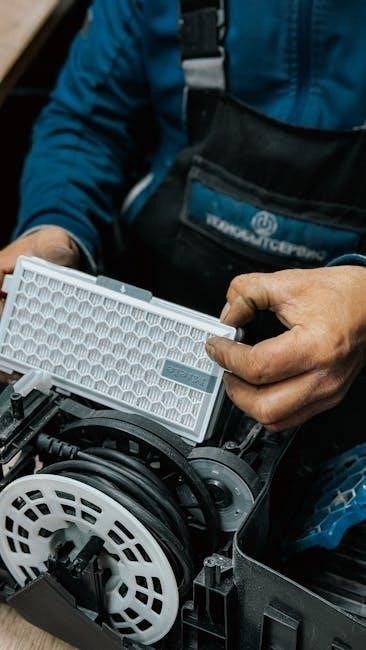
To replace the filter, first unplug your Holmes Air Purifier. Locate the filter access panel, usually on the back or bottom of the unit. Open the panel and remove the old filter, noting its orientation.
Insert the new filter, ensuring it fits snugly and aligns correctly. Close the access panel securely. Reset the filter replacement indicator (if applicable) following your model’s instructions. Proper filter installation is crucial for effective air purification.
Resetting the Filter Replacement Indicator
Resetting the filter indicator typically involves pressing and holding the “Reset” button on your Holmes Air Purifier for several seconds after a new filter is installed. Consult your specific model’s manual for precise instructions, as button locations and procedures vary.
This action informs the purifier that a fresh filter is in place, restoring accurate filter life monitoring and ensuring optimal performance.

Troubleshooting Common Issues
Common problems like a lack of power, reduced airflow, or unusual noises can often be resolved with simple checks and adjustments to your unit.
Air Purifier Not Turning On
If your Holmes air purifier fails to power on, first verify the unit is securely plugged into a functioning electrical outlet. Test the outlet with another device to confirm power delivery.
Ensure the power cord isn’t damaged; inspect for any visible cuts or fraying. Check if the filter is correctly installed, as some models won’t operate without proper filter placement. Finally, consult the user manual for any reset procedures or specific troubleshooting steps related to your model.
Reduced Airflow
Experiencing reduced airflow from your Holmes air purifier often indicates a clogged filter; Regularly replacing the filter is crucial for maintaining optimal performance; refer to the manual for the recommended schedule.
Inspect the air intake and outlet vents for any obstructions blocking airflow. Ensure the unit isn’t positioned too close to walls or furniture, restricting air circulation. A dirty pre-filter can also contribute to reduced airflow, requiring cleaning or replacement.
Unusual Noises
If your Holmes air purifier is making unusual noises, first ensure it’s placed on a level surface to prevent rattling. Check for any loose components or debris inside the unit that might be causing the sound. A vibrating fan could indicate a blockage or imbalance; inspect the fan blades carefully.
If the noise persists, consult the manual for specific troubleshooting steps related to your model, or contact Holmes support for assistance.

Cleaning and Maintenance
Regular cleaning ensures optimal performance. Wipe the exterior with a soft, damp cloth and, if applicable, gently clean the sensors to maintain accuracy.
Exterior Cleaning
To maintain your Holmes Air Purifier’s appearance and functionality, regular exterior cleaning is essential. Always disconnect the unit from the power source before cleaning. Use a soft, damp cloth to gently wipe down the exterior surfaces, removing any dust or debris. Avoid using harsh chemicals, abrasive cleaners, or excessive water, as these could damage the unit’s finish. Pay particular attention to the air intake and outlet vents, ensuring they are free from obstructions for optimal airflow.
Sensor Cleaning (if applicable)
If your Holmes Air Purifier model features sensors, periodic cleaning is crucial for accurate air quality readings. Gently vacuum or use a soft brush to remove dust accumulation from the sensor area – typically located near the air intake. Avoid using liquids or harsh chemicals directly on the sensor. A clean sensor ensures the purifier operates efficiently, automatically adjusting fan speed based on detected air quality levels, maximizing performance and longevity.

Advanced Features (Model Dependent)
Certain Holmes Air Purifier models boast smart capabilities, including app connectivity for remote control and monitoring, alongside an ionizer function for enhanced air purification.
Smart Features and App Connectivity
Modern Holmes Air Purifiers offer seamless integration with your digital lifestyle through dedicated mobile applications, available on both iOS (Apple App Store) and Android platforms (Google Play Store).
These apps, like “Ellucian Go” or “My Holmes”, allow users to remotely control purifier settings, monitor air quality in real-time, and receive notifications regarding filter status.
Accessing these features is straightforward – simply download the app, search for “My Holmes” in your app store, and log in using the same credentials as your MyHolmes portal account.
Ionizer Functionality
Some Holmes Air Purifier models incorporate ionizer technology, releasing negative ions into the air to attract and neutralize airborne pollutants like dust, pollen, and smoke.
This process causes these particles to become heavier, causing them to fall from the air and be more easily captured by the purifier’s filter system.
However, it’s important to note that ionizers can produce ozone, so consult your specific model’s manual for details on enabling or disabling this feature.
Safety Precautions
Always ensure the air purifier is properly grounded and avoid using extension cords. Keep the unit away from water and flammable materials for safe operation.
Electrical Safety
To prevent electrical hazards, always ensure the air purifier is plugged into a properly grounded outlet. Never operate the device with a damaged cord or plug, and avoid using extension cords or adapters. Disconnect the purifier from the power source before cleaning or replacing filters. Do not attempt to repair the unit yourself; contact qualified personnel for assistance. Keep the power cord away from heated surfaces and sharp edges to prevent damage and potential fire risks.
General Usage Guidelines
For optimal performance, position the air purifier on a flat, stable surface, away from obstructions like curtains or furniture. Regularly replace filters as recommended to maintain air quality. Avoid operating the purifier in excessively humid environments or near flammable materials. Do not insert any objects into the air vents. Ensure the unit is used in a well-ventilated area and is not covered during operation, allowing for proper airflow.

Warranty Information
Holmes products are backed by a manufacturer’s warranty against defects in materials and workmanship; register your product promptly for full coverage details.
Registering Your Product
Registering your new Holmes Air Purifier is a crucial step to validate your warranty and ensure access to important product updates and support resources. You can easily register online through the official Holmes website or via the MyHolmes Portal.
Having your product registered allows Holmes to efficiently address any potential issues and provide timely assistance. The registration process typically requires your model number and proof of purchase.
Understanding Warranty Coverage
Holmes Air Purifiers come with a limited warranty protecting against defects in materials and workmanship. The duration of coverage varies by model, so reviewing your specific product documentation is essential.
The warranty typically covers repair or replacement of defective parts, but does not cover damage resulting from misuse, accidents, or unauthorized modifications. Registering your product promptly is vital for warranty validation.
Holmes Support Resources
Holmes provides comprehensive support via their Help Desk at (888) 422-4457, online manuals, and FAQs accessible through the MyHolmes portal for assistance.
Holmes Help Desk Contact Information
For direct assistance with your Holmes Air Purifier, you can reach the Holmes Help Desk at (888) 422-4457. This dedicated support line is available to address your questions and concerns. Alternatively, explore the MyHolmes portal for chat options through Major Access.
Remember, accessing support resources is streamlined through the MyHolmes platform, offering convenient solutions for troubleshooting and product information. Don’t hesitate to utilize these valuable tools!
Accessing Online Manuals and FAQs
Comprehensive support for your Holmes Air Purifier is readily available online through the MyHolmes portal. You can easily find detailed manuals and frequently asked questions (FAQs) to guide you through setup, operation, and troubleshooting.
The MyHolmes platform, accessible via the Ellucian Go app (Apple & Android), provides a centralized hub for all your product-related resources, ensuring a seamless user experience and quick answers to common inquiries.
MyHolmes Portal Information
MyHolmes is your central access point for product support, including manuals and FAQs, and managing your Holmes Air Purifier experience online.
Accessing MyHolmes
MyHolmes is conveniently accessible through multiple platforms, offering flexibility for users. You can access the portal via web browser, or by downloading the official Ellucian Go mobile app for both Apple (iOS) and Android devices.
Simply search for “My Holmes” in your respective app store to download and install the application. Alternatively, utilize the provided direct links for quick access. Remember, your MyHolmes login credentials are the same as those used for other Holmes services.
Login Credentials
Accessing MyHolmes requires your established username and password. Fortunately, these credentials are universally applicable across all Holmes Community College systems, streamlining the login process. If you’ve previously utilized MyHolmes for course registration, schedule management, or degree evaluation, you can reuse those same details.
If you’ve forgotten your login information, utilize the “Forgot Username” or “Forgot Password” options available on the MyHolmes login page to recover access quickly and securely.
Constant Air Volume (CAV) Systems & Air Purifiers
CAV systems deliver a consistent airflow, differing from variable systems; however, Holmes Air Purifiers focus on air cleaning, not volume control.
Understanding CAV in HVAC
Constant Air Volume (CAV) systems represent a traditional HVAC approach where the airflow rate remains fixed, regardless of temperature needs. While effective, CAV systems primarily adjust temperature by varying the supply air’s heating or cooling. This contrasts with Variable Air Volume (VAV) systems. CAV delivers conditioned air consistently throughout a building, utilizing air handling units and terminals. However, it’s crucial to remember that Holmes Air Purifiers aren’t HVAC components; they independently improve air quality by filtering pollutants, operating separately from the building’s overall ventilation strategy.
Relevance to Air Purification
Holmes Air Purifiers complement HVAC systems, including CAV, by addressing indoor air quality directly. While CAV manages temperature and basic ventilation, it doesn’t necessarily remove particulate matter or allergens. Holmes units actively filter these pollutants, enhancing the air within a space. They don’t replace HVAC, but rather work alongside it, providing a layered approach to a healthier indoor environment. This is especially beneficial in CAV systems where airflow isn’t dynamically adjusted for purification needs.

Financial Aid & Holmes Community College
Holmes Community College provides financial aid resources accessible through the MyHolmes portal, offering scholarships and aid information for students.
Accessing Financial Aid Information
To view your financial aid status at Holmes Community College, navigate to your personalized MyHolmes portal. This centralized hub provides comprehensive details regarding awarded aid, outstanding balances, crucial deadlines, and scholarship opportunities.
Simply log in and locate the dedicated financial aid section for a complete overview of your aid package and related information. Explore available scholarships directly through this portal as well!
Holmes Community College Overview
Holmes Community College stands as a comprehensive public institution situated in Central Mississippi, dedicated to providing innovative educational and cultural experiences.
The college delivers these opportunities through both traditional campus-based learning and convenient distance education programs, catering to a diverse student body. Holmes strives to empower students with the skills and knowledge needed for success in their chosen fields.